
Make SEO Changes Without Wrestling Your CMS
The Onsite Optimizer (OSO) is part of the KickstartSEO Toolkit. It helps us make technical and on-page SEO changes directly through the platform, without needing to log into your website's back end or write code.
That means useful SEO recommendations can move from “needs doing” to “done” with less faff, fewer delays, and a much lower chance of someone accidentally pressing the wrong button and ruining Tuesday.
Part Of The KickstartSEO Toolkit
Onsite Optimizer works alongside the KickstartSEO Portal, Norman, and the Approval Centre.
The Portal keeps the work organised. Norman helps analyse the data and identify useful opportunities. The Approval Centre gives clients a clear way to review recommended work that requires approval. Onsite Optimizer helps turn suitable on-page and technical SEO recommendations into practical website changes.
In plain English: it helps the right work get done without making everything harder than it needs to be.
The Norman Advantage
Helps analyse data, spot opportunities, and support clear recommendations.
The KickstartSEO Portal
Keeps SEO work, recommendations, and progress organised.
The Onsite Optimizer
Helps approved on-page and technical changes move from recommendation to action.
The Approval Centre
Gives clients a clear way to review work where approval is needed.
SEO Recommendations Are Only Useful When They Get Done
Most SEO work does not fail because every task is impossible.
It fails because useful recommendations get stuck. Someone needs to log into the CMS, find the right page, find the right field, make the change, check the formatting, and hope nothing has wandered off sideways.
The Onsite Optimizer removes a lot of that friction. It gives the work a clearer route from “we should fix this” to “that has been sorted”.
Reports do not improve websites. Action does. Annoying, but true.
Watch The Onsite Optimizer In Action
The short demo below gives you a quick look at The Onsite Optimizer inside the KickstartSEO Toolkit.
It shows how to choose a page, review the recommended actions, open the SEO controls, check assigned keywords, and view options to publish or revert changes.
This is not meant to be a full training session. It is simply a quick look at how The Onsite Optimizer helps useful SEO work move from “that needs attention” to “that can now be dealt with”.
What The Onsite Optimizer Helps You Change
The Onsite Optimizer supports a wide range of technical and on-page SEO changes without forcing you into the back end of your website.
That can include simple content improvements, technical SEO settings, and structured data changes that would normally require more confidence, more time, or someone muttering darkly at the CMS.
It is especially useful when small but important changes need to be made across several pages. Instead of treating every update like a separate project,
The Onsite Optimizer gives the work a clearer route through the KickstartSEO Toolkit.
Common actions The Onsite Optimizer can support include:
- Page Copy
- Heading tags
- Page titles
- Meta descriptions
- Canonical URLs
- Meta robots tags
- JSON-LD schema markup
- Keyword-focused content improvements
- Internal linking opportunities
Available options can vary depending on the website, the page, and the recommendation.
Choose The Page, Then Follow The Actions
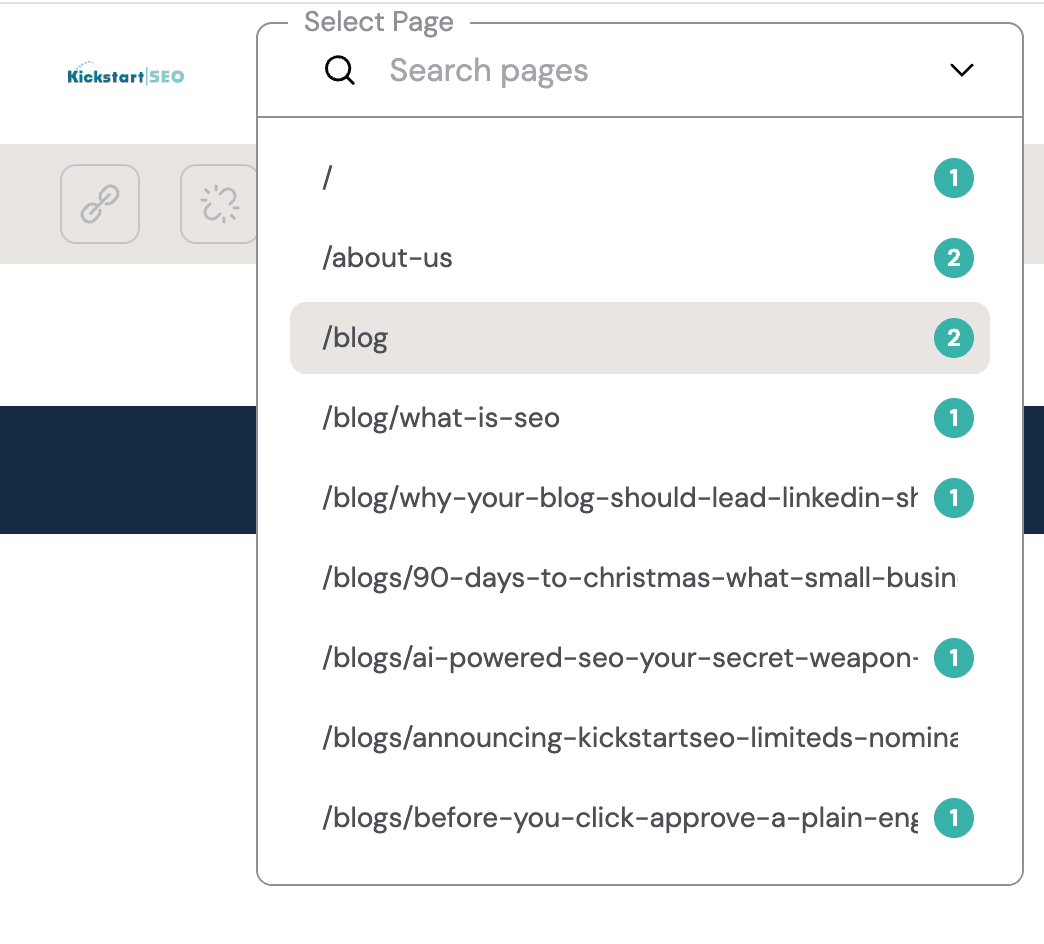
The Onsite Optimizer lets you choose the page you want to review from a simple page selector.
The numbered markers give a quick visual indication of how many actions need attention on each page.
That makes it easier to see where the work is, instead of digging through reports or guessing which page needs help first.
Once you are on the page, you can review assigned keywords, open SEO settings, publish approved changes, or revert changes where needed.
This is useful because not every page needs the same level of attention.
Some pages may only need a small metadata tweak. Others may need several actions before they are properly aligned with the assigned keywords.
The Onsite Optimizer makes that easier to spot at a glance. You can start with the pages showing active recommendations, deal with the most useful actions first, and avoid wasting time poking around pages that are already in decent shape.
That matters because good SEO is not about changing everything for the sake of it. It is about knowing where attention is needed, then making sensible improvements in the right place.

Clear Actions, Not Vague SEO Advice
When you choose a page in The Onsite Optimizer, the actions panel shows what needs attention.
Instead of handing you a long SEO report and leaving you to decode it over a cold cup of coffee, the panel breaks the work into clear, manageable actions. You can see what needs doing, why it matters, and how to deal with it.
For Optimiser Essentials clients, this gives practical guidance you can follow yourself. For Optimiser AI and Optimiser Premium clients, it gives useful visibility into the recommendations Norman is supporting and the work being carried out.
See The Live Actions
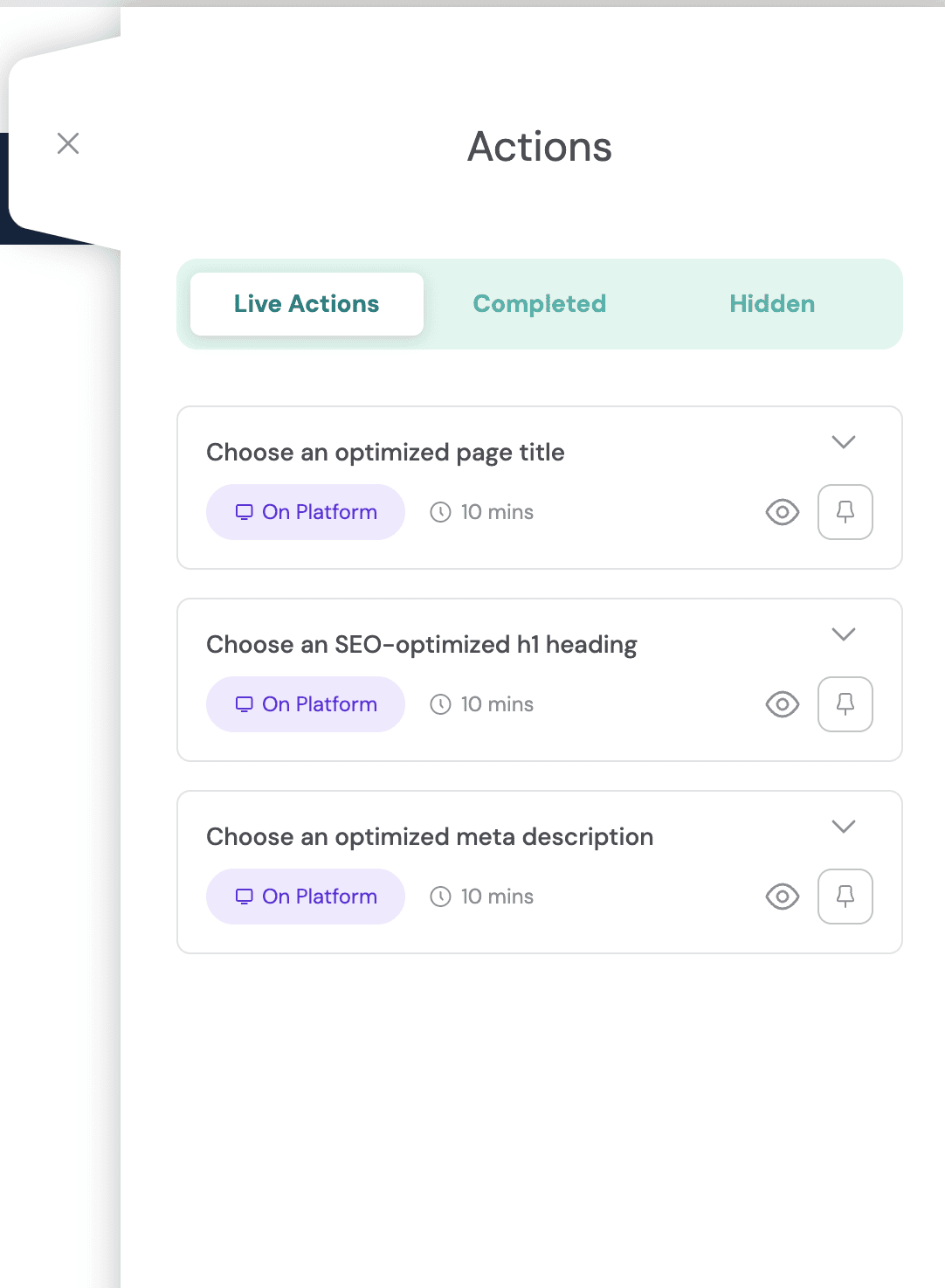
The actions panel shows the live recommendations for the selected page.
In this example, there are three actions to review: the page title, H1 heading, and meta description.
Open The Recommendation
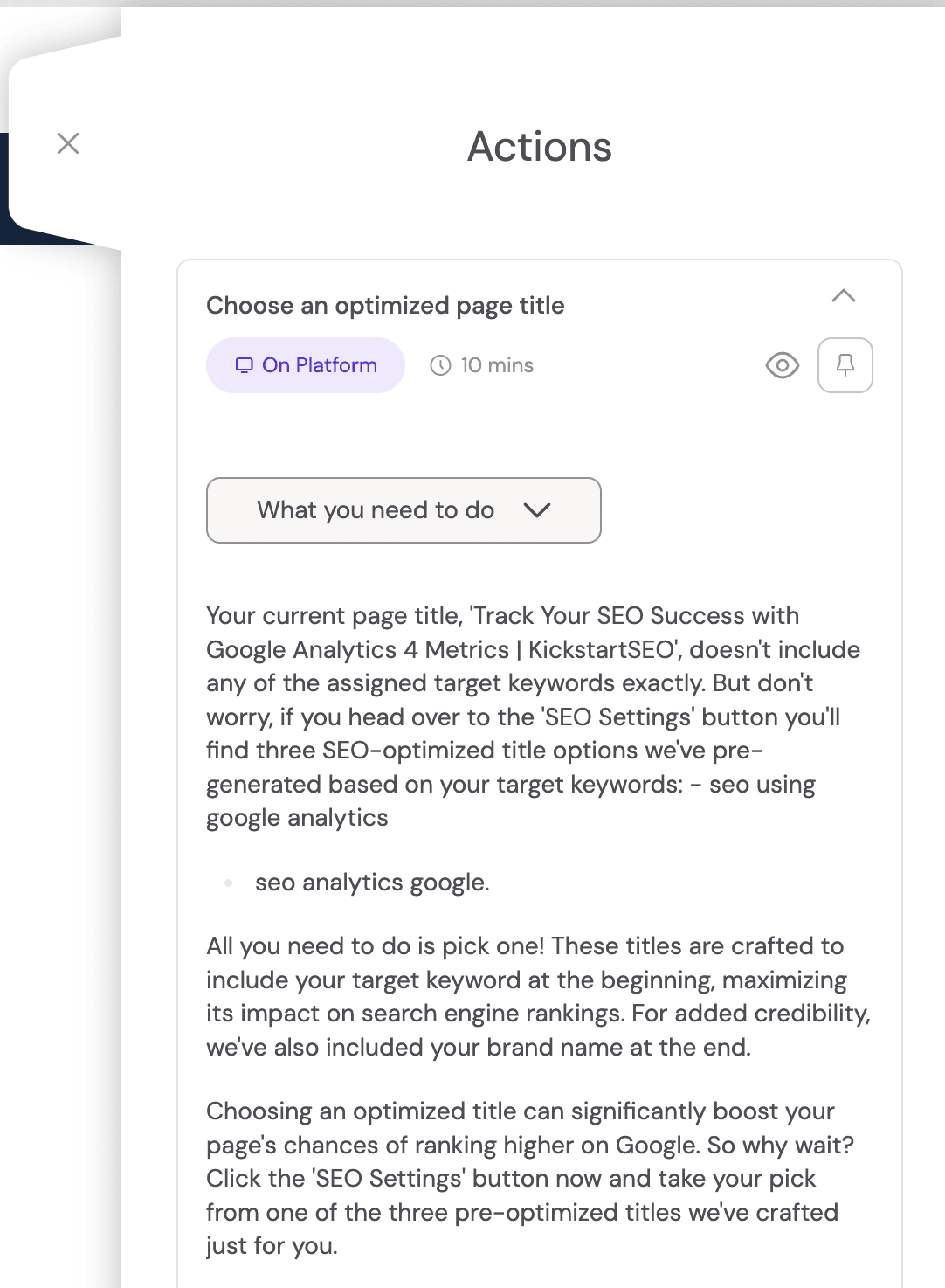
Each action expands to show what needs to be done.
Here, the page title action explains that the current title does not include the assigned target keyword clearly enough.
Understand Why It Matters
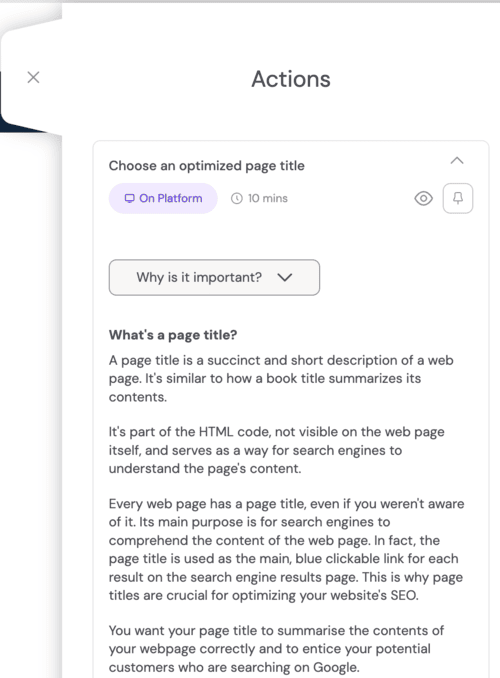
The panel explains why the recommendation matters in plain English.
That helps you understand the purpose behind the work, instead of blindly ticking boxes and hoping Google sends flowers.
Follow The Practical Guidance
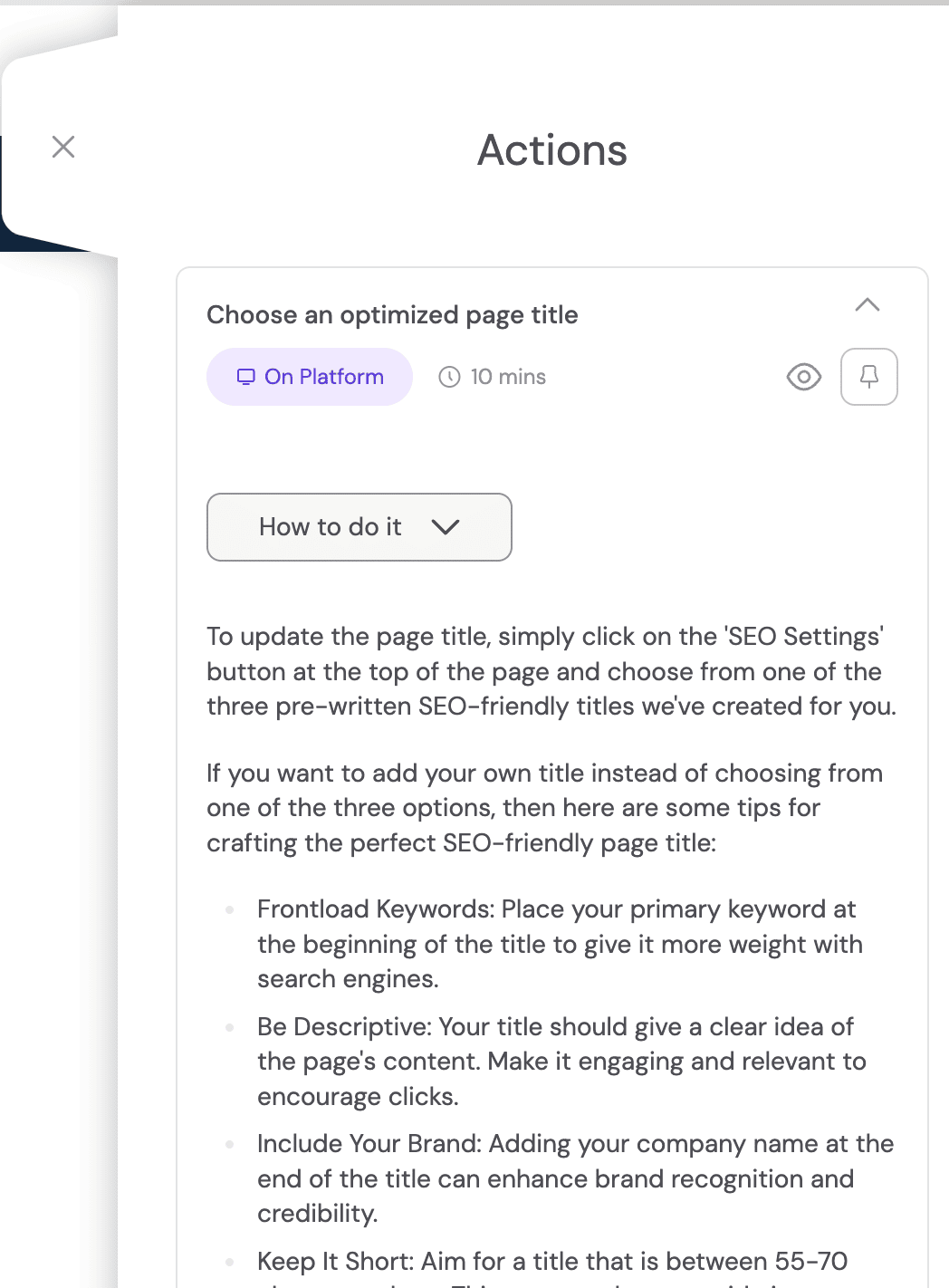
The final view shows how to complete the action, including useful guidance on structure, keyword placement, clarity, and best practice.
Because doing it yourself shouldn't mean doing it alone.
How Each Optimiser Programme Uses The Onsite Optimizer
The Onsite Optimizer is part of the wider KickstartSEO Toolkit, but how it is used depends on the level of support you choose.
Some clients want hands-on guidance. Others want more of the work handled for them. Either way, the aim is the same: clear recommendations, sensible action, and less time wasted fighting with the back end of a website.
Optimiser Essentials
The Onsite Optimizer is optional for Optimiser Essentials clients.
It is useful if you want a clearer way to apply guided SEO changes without working directly inside your CMS. You stay hands-on, but you are not left guessing what to do next.
Optimiser AI
The Onsite Optimizer is part of the Optimiser AI workflow.
Norman helps identify useful opportunities and support recommended actions. The Onsite Optimizer helps those approved changes move forward in a clearer, more controlled way.
Optimiser Premium
The Onsite Optimizer is one of the tools we use as part of Optimiser Premium.
Michael leads the strategy and delivery, using the right tools for the job. When The Onsite Optimizer is the best route, it helps support cleaner implementation, easier checking, and more organised on-site SEO improvements.
Useful, Controlled, And Reversible Where Needed
The Onsite Optimizer is there to make useful SEO changes easier to manage, not to encourage people to change things for the sake of it.
Good SEO still needs judgement. Some recommendations should be applied. Some should be reviewed first. Some may not be right for that page, that business, or that moment.
That is why The Onsite Optimizer sits inside a wider process. Actions can be reviewed, published, dismissed, hidden, completed, or reverted where appropriate.
Random fiddling is still random fiddling. This just gives sensible work a better route to the finish line.
Before You Change Anything, Know What Matters
The Onsite Optimizer helps useful SEO work get done, but the first job is knowing which changes are worth making.
Start with a Free SEO Audit and we’ll show you what is helping, what is holding your website back, and where the best opportunities are.
Or, if you already know you want structured SEO support, compare the Optimiser programmes and choose the level that fits your business.