
Optimiser AI works best when Norman can keep the SEO work moving, and you can still see what is happening.
That is what the Approval Center is for.
It gives you one clear place to review Norman’s recommended actions, make decisions, and keep control of what gets changed, published, or approved.
Think of it as Norman coming into your office once a week with an update. He shows you the work, explains what matters, and asks what you want to do next.
You can approve actions, request changes, reject anything that is not right, extend review time where available, or let suitable work go live on the Approve by date if your settings allow it.

The Approval Center is part of Optimiser AI, our Done With You SEO programme.
It is not included with Optimiser Essentials and is not needed in Optimiser Premium, because Premium is fully managed by KickstartSEO.
What Is The Approval Center?
The Approval Center is your weekly decision point inside Optimiser AI.
Each item gives you enough context to understand what Norman is recommending and what decision is needed from you.
Most of the time, your role is straightforward. Read the recommendation, check it makes sense for your business, and choose what happens next.
You are not expected to become an SEO specialist. You are there to check the business reality: services, locations, names, claims, tone, and anything else only you would know.
That is the point of the Approval Center: clear tasks, sensible decisions, and steady progress without turning SEO into guesswork.
Built Around Optimiser AI
That is where the Approval Center fits.
Norman prepares recommended SEO actions. You review the important decisions. The work keeps moving without you having to manage the whole SEO process yourself.
This matters because SEO is not a one-off task. Last month’s results help guide this month’s actions. This month’s actions help shape next month’s results.
The Approval Center gives that cycle structure. It helps keep the work visible, organised, and moving in the right direction.
Optimiser AI is not hands-off SEO.
It is guided SEO, with Norman doing the work and you keeping control of the decisions that matter.
How The Approval Center Works
When Norman prepares an eligible SEO action, it appears in the Approval Center with the details you need to review it.
You can see what Norman wants to change or publish, why the action matters, and the available options.
Most actions follow a simple pattern.
Norman Prepares The Action
This could be a page title, meta description, heading, Google Business Profile post, blog draft, website copy, or another eligible SEO action.
You Review the Action
You check the wording, accuracy, business details, tone, and anything else that matters before the work moves forward.
You Decide What Happens Next
You can approve it, request changes, reject it, extend the review time where available, or let suitable work go live on the Approve by date if your settings allow it.
Approved Work Moves Forward
Once an action is approved, Norman can continue with the next stage of the work.
No drama. No mystery. Just steady progress.
What Kind Of Work Appears?
The Approval Center can include different types of SEO actions, depending on what Norman is working on for your business.
Some actions are about your website. Some support your Google Business Profile.
Others may relate to content planning, blog writing, or improving how existing pages are understood by search engines.
Actions include:
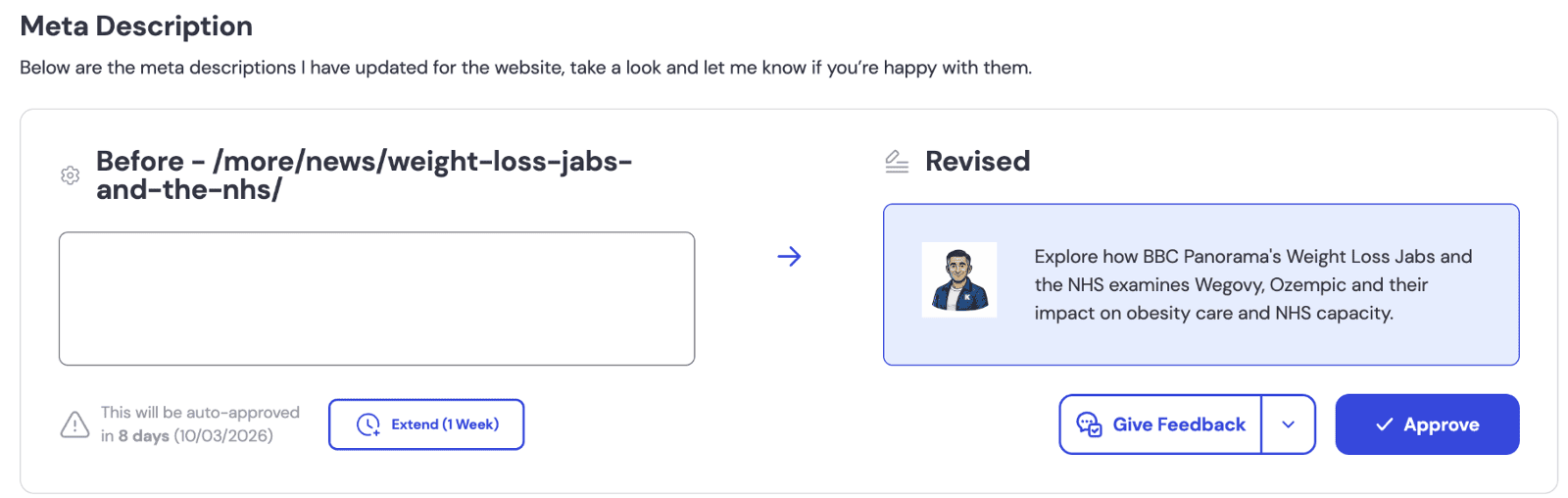
Google Business Profile Posts (shown)
Page titles
Meta descriptions
Headings
Website copy
New page content
Blog strategy
Blog drafts
Google Business Profile content
The exact action types may change as Optimiser AI develops, but the purpose stays the same: to show you the work that needs your decision before it moves forward.
You Can Ask For Changes
If something does not sound right, feels too formal, misses an important detail, or needs a small adjustment, you can ask Norman to revise it before it moves forward.
You do not need to speak fluent SEO. Plain English is fine. In fact, plain English is better.
You might say:
- Make this sound warmer.
- Mention our location.
- Remove that service.
- Shorten this.
- Make the call to action stronger.
- This sounds too formal.
Norman can then review your feedback and update the action.
The Approval Center is there to help the work move forward properly, not to force you into a yes-or-no decision before you are comfortable.
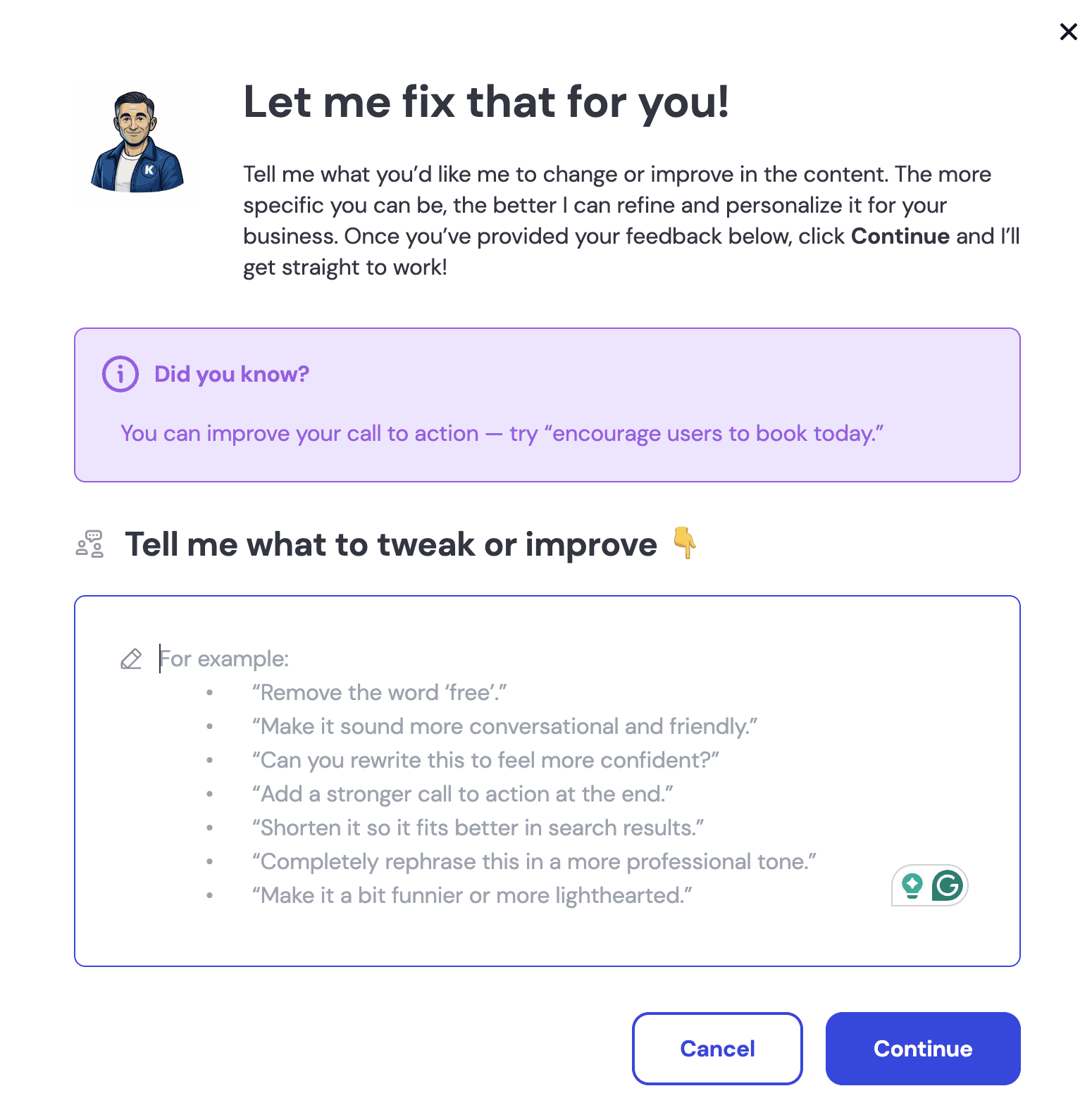
Norman learns from your changes. Tell him how you like to say something, and he'll say it that way every time!
Sit Down With Norman Once A Week
Optimiser AI works best when you treat the Approval Center as a regular SEO check-in.
We recommend choosing one day each week to sit down with Norman, review new actions, and make any decisions needed.
It does not need to take over your day. Most of the time, you are reading, checking, approving, asking for a small amendment, or extending a deadline if life has got in the way.
Norman will email you when new actions are ready, so the work stays visible.

We know SEO is not the only thing in your world. But it still needs to be managed.
The businesses that get the most from Optimiser AI are the ones that build a simple habit around the Approval Center.
Same day. Same rhythm. Less chaos.
Client Responsibility Within Optimiser AI
Optimiser AI is designed to keep SEO work moving, but it is not a “set it and forget it” service.
As an Optimiser AI client, you remain responsible for reviewing the actions Norman sends for approval, checking that business details are accurate, and making decisions before the Approve by date where needed.
You can approve an action, request changes, reject it, extend the review period where available, or let suitable work go live on the approval date if your settings allow it.
Norman will email you when new actions are ready, but the Approval Center still needs regular attention.
That is how Optimiser AI works best: Norman does the work, you stay in control, and the strategy keeps moving instead of sitting in a queue gathering dust.
Approval Dates Keep The Strategy Moving
Good SEO strategy is not just about knowing what to do. It is about getting the right tasks done in the right order.
That is why every approval item has an Approve by date.
The date gives each action a clear place in the workflow. It helps you see what needs attention, keeps Norman's monthly strategy organised, and stops useful work from drifting into the “I’ll look at it later” pile.
You can still approve, amend, reject, or extend items before the approval date where those options are available.
You can also let suitable work go live on the Approve by date if your settings allow it. Nothing goes live unless your settings allow it.
This gives Optimiser AI a sensible rhythm: Norman prepares the work, you stay in control, and the strategy keeps moving without turning SEO into another messy admin job.
What The Approval Center Is Not
The Approval Center is there to help Optimiser AI clients review and manage eligible SEO actions. It is not designed to replace every other part of your website or marketing process.
It is not a full website design review system.
It is not a replacement for checking that your own business details, services, prices, claims, and locations are accurate.
It is not where every tiny technical SEO adjustment will appear for approval.
It is not a “when I have time” inbox. For Optimiser AI to work properly, the Approval Center needs regular attention.
That may sound obvious, but it matters. The Approval Center gives you control, but control only works when you use it.
Plain-English Approval Center Glossary
The Approval Center uses SEO terms because Norman is recommending SEO work.
That does not mean you need to become an SEO specialist before you click approve. You just need enough plain-English context to understand what Norman is asking you to review.
Use this section as your reference point when a term looks familiar, but still feels slightly suspicious.
Search And AI Visibility
These terms explain how people find your business through Google, AI search tools, and answer-led search results.
Keyword
A keyword is a word or phrase people type into Google or another search tool when they are looking for something.
For example, someone might search for “emergency plumber near me” or “accountant for small business”.
Keywords still matter because they help us understand what people are actually searching for.
They are not the whole strategy, but they are still part of the evidence.
AI Overviews
AI Overviews are AI-generated summaries that can appear in Google search results.
They are designed to give people a quick answer using information Google has found from different sources.
For businesses, this means clear, helpful, well-structured content matters even more.
AEO
AEO stands for Answer Engine Optimisation.
It means shaping your content so it answers real questions clearly.
This matters because people do not only search with short phrases anymore. They ask questions, compare options, and expect direct answers.
AEO helps your website become more useful to people and easier for search systems to understand.
Traditional Search
Traditional search means the familiar search results people see in Google, Bing, and other search engines.
It usually includes organic results, map results, paid ads, snippets, and business listings.
Traditional search still matters. AI search is growing, but people are still using Google every day to find local businesses, services, and answers.
GEO
GEO stands for Generative Engine Optimisation.
It focuses on how your business may be understood, referenced, or surfaced by AI-powered search tools.
This does not replace traditional SEO. It adds another layer.
Your content still needs to be clear, accurate, useful, and well structured.
AI Search Tools
AI search tools are platforms that use artificial intelligence to answer questions, summarise information, or recommend options.
Examples include tools such as ChatGPT, Perplexity, Gemini, and other AI-powered systems.
The important point is simple: your business needs clear, trustworthy content that can be understood by both people and machines. Useful beats clever. Every time.
Google Business Profile Actions
These terms relate to the updates Norman may prepare for your Google Business Profile.
Google Business Profile Reviews
Google Business Profile reviews are the public reviews customers leave on your Google listing.
They can help people decide whether to contact your business, and they can also support local visibility.
When Norman helps with review responses, you still need to check that the reply sounds right, matches your business, and handles the customer properly.
Google Business Profile Posts
Google Business Profile posts are short updates that appear on your Google Business Profile.
They can be used to share services, offers, news, seasonal updates, or helpful information.
Norman may prepare these posts to keep your profile active, useful, and more engaging for people who find you through Google.
Strategy Foundations
These terms explain the business information Norman uses to keep SEO actions accurate and aligned with your company.
Living Documents
Your Business Profile and Tone Of Voice Guide are created during onboarding, but they are not set in stone.
When you give feedback on actions in the Approval Center, Norman can use that feedback to improve the information he works from.
The longer you work together, the better Norman understands your business, your preferences, and how your content should sound.
You can also update your Business Profile or Tone of Voice Guide when something changes. That might be a new service, a new location, a change in opening hours, or simply a better way to describe what you do.
Business Profile
Your Business Profile is the information Norman uses to understand your business.
It may include details about your services, locations, customers, competitors, opening hours, tone, and anything else needed to guide the SEO work.
Keeping this information accurate helps Norman make better recommendations.
Tone Of Voice Guide
Your Tone Of Voice Guide explains how your business should sound in written content.
It helps Norman write in a way that fits your brand, avoids the wrong tone, and keeps website copy, blog content, and Google Business Profile updates consistent.
If something does not sound quite right, you can still give feedback before it moves forward.
On-Page SEO
Page Title
A page title is a behind-the-scenes title search engines use to understand what a page is about.
It can also appear as the clickable blue link in Google search results.
It is not always the same as the visible page heading or blog title. A good page title should be clear, relevant, and focused on the page’s main topic.
Meta Description
A meta description is a behind-the-scenes summary that can appear under your page title in search results.
It is not usually visible on the page itself.
It does not directly control rankings, but it can influence whether someone chooses to click.
Headings
Headings are visible titles and section labels on a page.
They help visitors scan the content and help search engines understand how the page is organised.
Good headings make a page easier to read, which is usually good for humans and search engines. Funny how often that overlaps.
Heading Tags
Heading tags are behind-the-scenes HTML labels attached to visible headings.
They usually run from H1 to H6 and help show the structure of the page.
You do not need to manage these yourself, but they help Norman understand whether a page is organised properly.
H1 Tag
The H1 is usually the main visible heading of a page.
Most pages should have one clear H1 that tells people and search engines what the page is mainly about.
Think of it as the page’s headline, not a place to cram every keyword you have ever liked.
H2 Tag
H2 headings are visible headings used for major sections within a page.
They help break the content into clear parts, making it easier for visitors to scan and easier for search engines to understand.
A good H2 should explain what the next section is about.
Content Actions
These terms relate to the content Norman may plan, draft, revise, or recommend for your website.
New Page Content
During onboarding, Norman may identify new pages needed to support your keyword strategy.
Over time, he can prepare the content for those pages. You may also choose to target keywords from your strategy later, and Norman can create new page content to support them.
New page content is not the same as blog content. They are two different parts of your SEO strategy, and they work best when they support each other.
Blog Strategy
Norman prepares your blog strategy six months at a time, so there is a clear direction behind the content.
You approve blog topics one at a time, month by month. That gives the strategy structure without boxing you into a plan that may become outdated as your business changes.
A blog strategy is not “write something because it is Tuesday”. There should be a reason for it.
Blog Post Draft
A blog post draft is a proposed article written for your website.
It may be designed to answer customer questions, support important services, improve search visibility, or strengthen your wider SEO strategy.
Before approving a draft, check that it is accurate, suitable for your business, and something you are comfortable publishing.
Website Copy
Website copy is the written content visitors read on your website.
That may include service page text, homepage wording, section copy, calls to action, and explanatory content.
When Norman recommends changes, check that the wording is accurate and sounds right for your business.
Technical And Approval Terms
These terms explain how approval deadlines, technical changes, action history, and reversals work inside Optimiser AI.
Approve By Date
The Approve by date is the date shown on an approval item.
It tells you when the action is due to move forward, depending on your settings.
You can approve, request changes, reject, or extend the review period, where available, before that date.
Or, you can allow the recommendation to proceed without any further action.
Alt Image Text
Alt image text is a behind-the-scenes description added to an image.
It helps search engines and accessibility tools understand what the image shows.
Good alt text should be clear and useful. It is not a place to stuff keywords until the sentence starts limping.
Canonical Tags
Canonical tags are behind-the-scenes signals that help search engines understand which version of a page should be treated as the main version.
They are useful when similar or duplicate pages exist.
Most clients will never need to touch them, but Norman may handle them as part of technical SEO work.
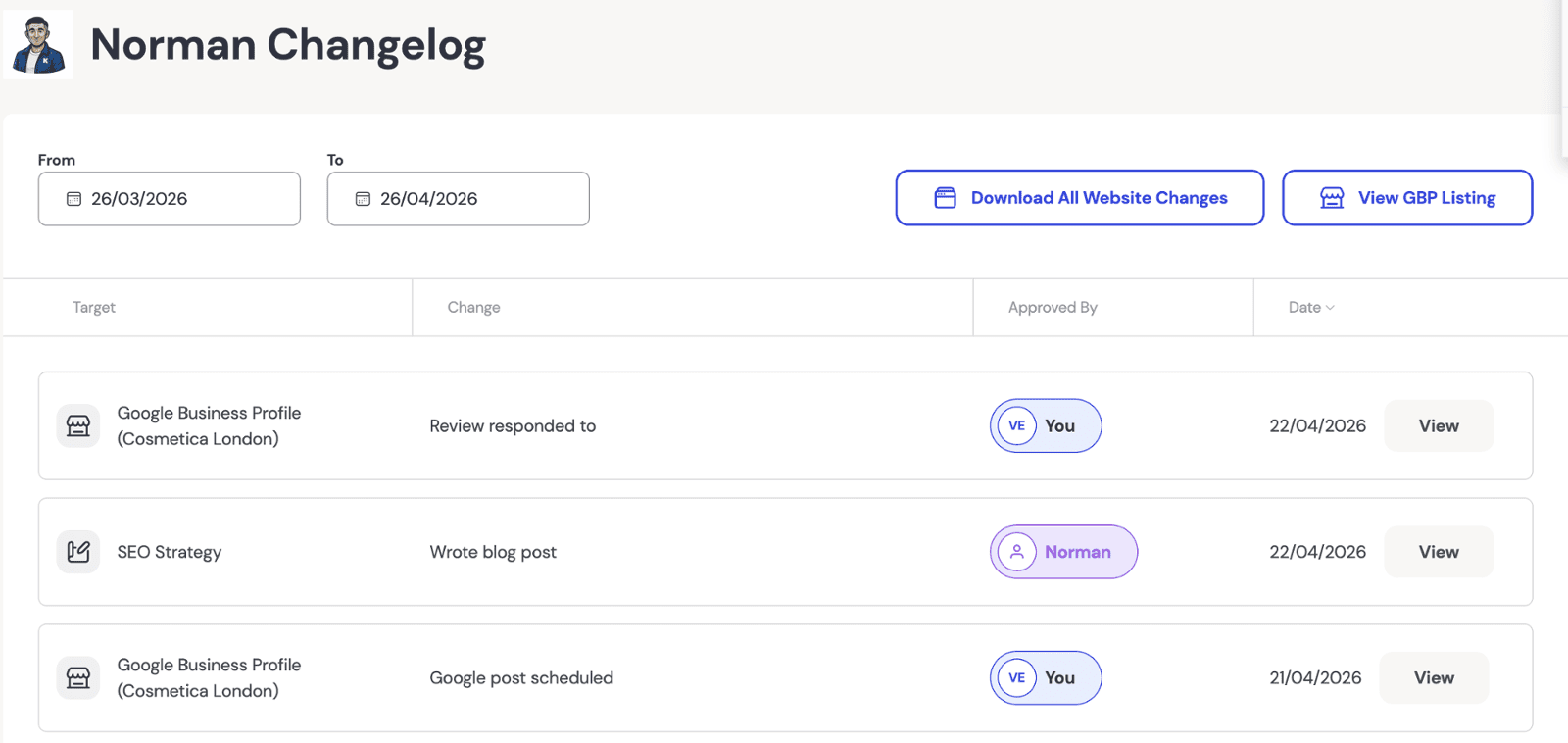
Changelog
The changelog records actions carried out by Norman and actions taken by the client.
It provides a clear history of what has happened, including completed SEO actions and some technical updates that may not require a full approval process.
This helps keep the work transparent.
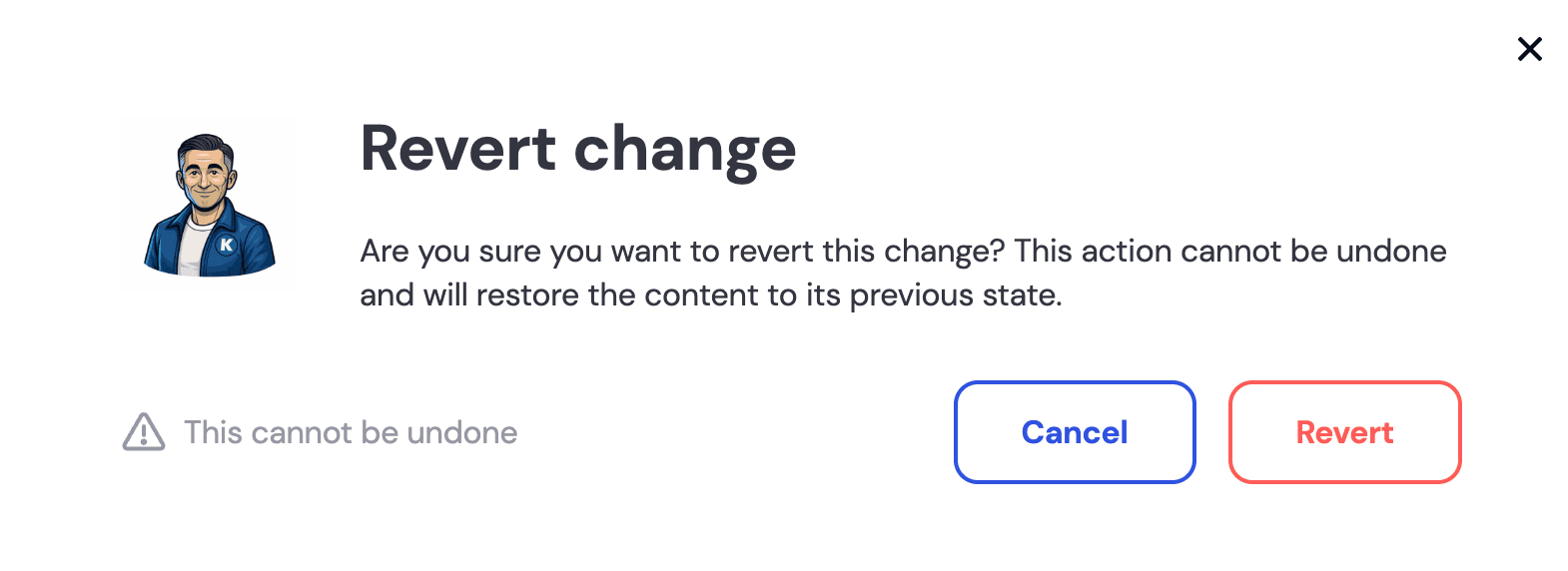
Reverted
Reverted means a completed change has been undone.
In the changelog, completed actions include a revert option that restores the previous version.
It is a useful safety net because it means approved changes are not carved into stone.
Before You Click Approve
You do not need to check every SEO detail. That is Norman’s job. Your job is to check the business reality.
Before approving an action, ask yourself whether the recommendation is accurate, appropriate, and something you are happy to put in front of customers.
If anything feels wrong, do not approve it yet. Ask for changes, reject the action, or extend the review time where available.
That is not slowing the process down. That is using the process properly.
- Is the business information correct?
- Are services, locations, prices, names, and claims accurate?
- Does the wording sound right for your business?
- Is there anything you would be uncomfortable publishing?
- Does the action make sense based on what Norman is trying to improve?
After Approval, Check The Live Result
Once visible work goes live, it is worth checking the result on your website or Google Business Profile.
Norman can improve SEO content, structure, and visibility signals, but he cannot magically fix every website layout issue, theme quirk, plugin wobble, or design problem that already exists.
If the change affects a live page, check it on desktop and mobile.
You are not looking for perfection in every pixel. You are making sure the page still looks right, reads properly, and presents your business well.
The Approval Center helps you review work before it goes live. Once it is live, check the website page or Google Business Profile update yourself.
If something looks wrong on your website, you can use the Onsite Optimizer to tidy it up. You can adjust formatting, spacing, and wording, or revert the change if it really is not right.
If something needs changing on your Google Business Profile, use the Local dropdown in your portal menu to review and amend the relevant profile content.
A little time and attention at this stage can make a big difference. SEO still needs human eyes. Funny that.
Changes Can Be Reverted
Once an action has been completed, it appears in the changelog.
The changelog records work carried out by Norman and actions taken by the client, so there is a clear history of what happened and when.
If a completed action needs to be undone, it can be reverted. That restores the content to its previous state.
There is also a confirmation step before a revert is applied, so changes are not undone by accident.
This gives Optimiser AI clients a practical safety net. You can review work before it goes live, see what has already happened, and reverse a completed action when needed.
In plain English: Norman keeps the work moving, but you keep control of the keys.
Approval Center, KickstartSEO Portal, And Onsite Optimizer
KickstartSEO Portal
The KickstartSEO Portal is your wider client workspace.
It brings together reporting, strategy information, actions, learning, settings, and support so you can see what is happening with your SEO in one place.
Approval Center
The Approval Center is where eligible Optimiser AI actions are reviewed before they move forward.
This is where you approve work, request changes, reject actions, extend review time where available, or let suitable work go live on the Approve by date if your settings allow it.
Onsite Optimizer
The Onsite Optimizer is used for editing and tidying website content after approved on-page work has been applied.
You can use it to adjust wording, spacing, and formatting for supported website content without digging into the back end of your website.
Want Norman Moving The Work Forward While You Stay In Control?
That is exactly what Optimiser AI is built for.
Norman prepares the recommended SEO actions. You review the important decisions. The Approval Center keeps the work visible, structured, and moving.
It is not hands-off SEO, and it is not DIY SEO either.
It is guided SEO for businesses that want consistent progress without losing control of what gets changed, published, or approved.