

Creating more content sounds sensible.
Most small businesses have heard some version of that advice. Write more blogs. Add more pages. Answer more questions. Feed Google. Feed AI search. Feed the machine.
Egads.
But publishing content is only half the job. The other half is deciding where that content belongs and how it connects to the rest of the website.
What's inside? (TL;DR)
This article explains how to decide whether new website content should become a blog post, a content page, a menu page or a hidden page.
It also explains why hidden content is not the problem, but orphan content definitely is.
Useful Sections
Estimated reading time:
8 minutes
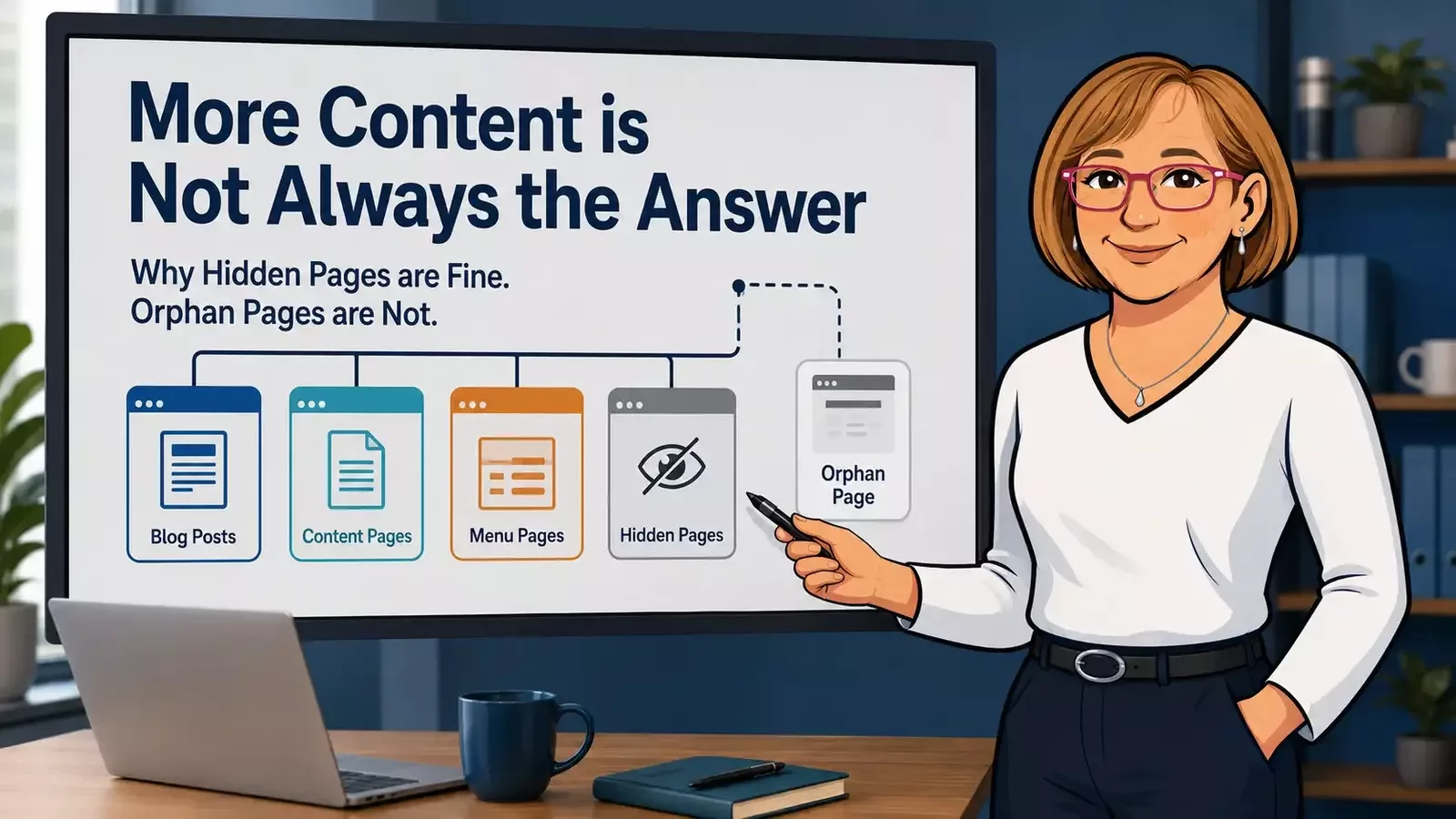
A blog post, service page, content page, hidden page and menu page all do different jobs. The mistake is treating them as interchangeable.
That is how websites become messy.
Blog posts start trying to sell services. Service pages start answering casual questions. Menus turn into filing cabinets. Useful pages get created, then left sitting quietly in the background where nobody can find them.
Hidden content is not bad SEO.
Orphan content is.
More Content is Not Always the Answer
More content can help.
It can answer customer questions, support search visibility, explain services, strengthen trust, and give people more useful routes through your website.
But only if that content has a clear job.
A page needs three things:
a purpose
a proper home
a path to reach it
Without those, you are not really building a stronger website. You are just adding more rooms to the house and forgetting to build the doors.
That might sound dramatic, but it happens all the time.
A business creates a useful new page, leaves it out of the menu, does not link to it from anywhere relevant, then wonders why it is not doing much.
The page may exist. That does not mean it is being used.
How Norman Helps Plan Monthly SEO Content
Inside KickstartSEO’s Optimiser AI workflow, Norman helps plan monthly content based on keyword strategy, keyword performance and practical opportunities.
Each month, Norman may create:
one blog post
up to three content pages
That does not mean every client gets four pieces of content every month, whether they need them or not. That would be content production with a blindfold on. Very busy. Not very clever.
The blog post is usually educational, explanatory, timely or question-led. It helps people understand a topic, answer a common concern, or make sense of something that affects their business.
The content pages are different. They are usually more targeted. They may support a specific keyword opportunity, a service area, a customer journey, a campaign, or a more permanent piece of website structure.
The important part is judgement.
Not every idea should become a blog. Not every keyword needs a visible menu page. Not every useful page belongs in the main navigation.
The question is not just, “Can we create this?”
The better question is, “Where should this live, and how will people find it?”
When a Topic Should Become a Blog Post
A topic should usually become a blog post when it is helping someone understand something.
Blogs are useful when the topic:
answers a common question
explains a concept
responds to a change or trend
challenges misinformation
supports early-stage research
helps people understand what matters before they buy
A blog is often the right place for “how,” “why,” “what does this mean?” and “should I be worried?” type questions.
For example, if a business owner wants to understand whether AI search means SEO is dead, that is probably a blog topic.
It is explanatory. It is timely. It deals with confusion. It gives the reader context before they make decisions.
A blog does not need to sell hard. In fact, it usually should not.
A good blog earns trust by being useful. It helps the reader feel less confused than they were five minutes ago. Mad concept, right?
It can also support internal linking. A blog can point people towards relevant services, deeper content pages or practical next steps.
That makes it useful for visitors and search engines.
When a Topic Should Become a Content Page
A topic should usually become a content page when it is more permanent, more targeted, and more closely connected to a keyword opportunity or customer journey.
Use a content page when the topic:
supports a specific keyword opportunity
explains a more permanent subject
helps a visitor move through the buying journey
deserves more structure than a blog post
supports an existing service or conversion path
A content page sits somewhere between a blog and a core service page.
It is not always a main service. It may not belong in the top menu. But it still has a clear job.
For example, a page explaining a specific SEO issue for a particular type of business might not need to be a main menu item. But it could still be useful for search, helpful for customers, and relevant as supporting content from a service page or blog.
A content page is usually less “here is our latest thought” and more “this subject deserves a proper place on the website.”
That is the difference. Blogs are often conversational and timely. Content pages are usually more structured and lasting.
When a Content Page Should Be Added to the Menu
A content page should be added to the menu when it is important enough for visitors to find directly.
That usually means it:
represents a core service
supports a key conversion path
helps people understand what the business offers
answers a major visitor need
belongs in the main customer journey
The menu is not there to list every page on the website. It is there to help visitors move.
If someone lands on your homepage and wants to understand your main services, pricing, approach, contact details or core resources, the menu should help them get there without needing a map, a packed lunch and emotional support.
But if every useful page goes into the menu, the menu becomes a filing cabinet.
That is not helpful. It creates clutter. It slows down decisions. It makes the website feel harder to use.
A tidy menu is good. A tidy menu full of disconnected pages behind the scenes is not.
When a Content Page Should Stay Hidden from the Menu
Some content pages should stay hidden from the main menu.
That does not mean they are secret. It does not mean they are bad. It does not mean Google has been told to ignore them. It usually just means they are too specific for the main navigation.
A page may be useful but still not deserve a seat at the top table.
Keep a content page hidden from the menu when it:
supports a niche keyword opportunity
answers a focused question
supports a campaign, audit, onboarding step or follow-up journey
would clutter the main navigation
is useful in context but not something visitors are likely to look for directly
This is where small businesses often get nervous.
They hear “hidden page” and assume it must be bad for SEO. It is not.
Hidden from the menu does not mean hidden from search engines.
A hidden page can still be useful for visitors and search engines if it is crawlable, indexable, included where appropriate, and internally linked from relevant pages.
The danger is not hiding it from the menu.
The danger is hiding it from common sense.
Hidden Does Not Mean Blocked
This bit matters.
A hidden page should not automatically be:
noindexed
blocked by robots.txt
excluded from the sitemap
disconnected from the rest of the website
Those are different things. Hidden usually means “not shown in the main navigation.”
Blocked means search engines are being told not to crawl or index it. Orphaned means the page has no meaningful internal links pointing to it. These are not the same.
A hidden page can still be part of your SEO strategy. It can still support a keyword. It can still help visitors. It can still be linked from blogs, service pages, support pages or follow-up emails.
That is why the wording matters.
If the page is useful, we do not want it lost. We just may not want it shoved into the main menu like one more coat in an already overloaded cupboard.
The Real Problem is Orphan Content
The real SEO problem is not hidden content. It is orphan content.
An orphan page is a page with no meaningful internal links pointing to it.
In plain English, that means the page exists, but the rest of the website does not really acknowledge it.
Visitors are unlikely to find it naturally. Search engines have fewer signals to understand where it fits. The page may have value, but it has no proper route in. It is like writing a helpful leaflet and putting it in a drawer.
Neat, but not exactly a marketing masterstroke.
If a hidden page is useful, it needs to be connected.
That might mean linking to it from:
a relevant blog post
a related service page
a supporting content page
a client resource page
a campaign landing page
a follow-up email or portal note
The link should make sense. Do not just scatter links around the site like confetti and hope one of them sticks.
Internal linking works best when it helps the reader move naturally from one useful thing to the next.
That is good for people. Conveniently, search engines tend to like websites that make sense for people.
Funny how that keeps happening.
A Simple Decision Test
When deciding where new content belongs, use this simple test.
Question | Best fit |
| Is it answering a useful question? | Blog post |
| Is it explaining or selling a core service? | Service page |
| Is it supporting a specific keyword opportunity? | Content page |
| Is it useful but too specific for the main menu? | Hidden content page |
| Is it important to visitors and conversions? | Add it to the menu |
| Is it hidden but still valuable? | Link to it from relevant content |
This is not about making the website bigger for the sake of it. It is about making the website clearer.
Good content should help someone do something, understand something, compare something, trust something, or take the next sensible step.
If it does none of those things, it probably does not need to exist.
There we are. Brutal, but efficient.
The Sensible Rule
Every useful page needs:
a purpose
a proper home
a path to reach it
That is the sensible rule. No drama. No menu stuffing. No orphan pages left wandering around the website like they missed the last bus.
Blogs are useful when they answer questions and explain ideas.
Content pages are useful when they support more permanent keyword opportunities or customer journeys.
Menu pages are useful when visitors need direct access.
Hidden pages are useful when they support focused needs without cluttering the navigation.
Orphan pages are the problem.
If your website has grown over time, there is a fair chance some useful content has ended up in the wrong place, or worse, disconnected from the rest of the site.
That is exactly the sort of thing a proper SEO review should uncover.
Because creating content is not enough. Content needs a job, a home and a route in.
Can We Help?
Many people end up on our blog because their SEO is not working the way they hoped, and they are trying to work out what to do next.
Sound familiar?
If your website has pages sitting quietly in the background, the question is not whether they are in the menu.
The question is whether they are doing a useful job, whether search engines can understand them, and whether visitors have a sensible route to them.